
Most of the time a client hands you copy that needs to be better: that is what Improve my copy is for. When there is nothing to improve yet, a new service, a launch email, a client without a website, use Start from a brief. You say what you need in one sentence, answer three or four questions, and get one finished draft. It is scored and checked the same way as improved copy.
Everything below comes from a real run on November 5, 2026: a 120-word email for our demo business Tidewell Bookkeeping (an invented business, answers typed as its owner). It took 38 seconds and 15 credits.
When to use it
| You have | Use |
|---|---|
| A page, an email or a draft, even a weak one | Improve my copy. It keeps what works, keeps testimonials word for word and tells you when your original is better. |
| Nothing written yet, or only a few notes | Start from a brief |
| A website, but you need a new piece (an email, an ad, a new service page) | Start from a brief, with the website address. CopyZap reads it for facts. |
It writes homepages, landing pages, service or product pages, about pages, blog posts, hero sections, headlines, USPs, slogans, emails, newsletters, social posts, ads, product descriptions, or a kind of text you name.
1. Say what you need
Open the app, click Start from a brief next to Improve my copy, and fill in What do you want written? Write it the way you would ask a person: what it is, who it is for, and how long. Add Your website if there is one; it is optional. Click Next.
CopyZap works out the kind of text, the goal, the language, the country and formal or informal. It shows them under What you're getting, where you can change any of them, or click Change my request.
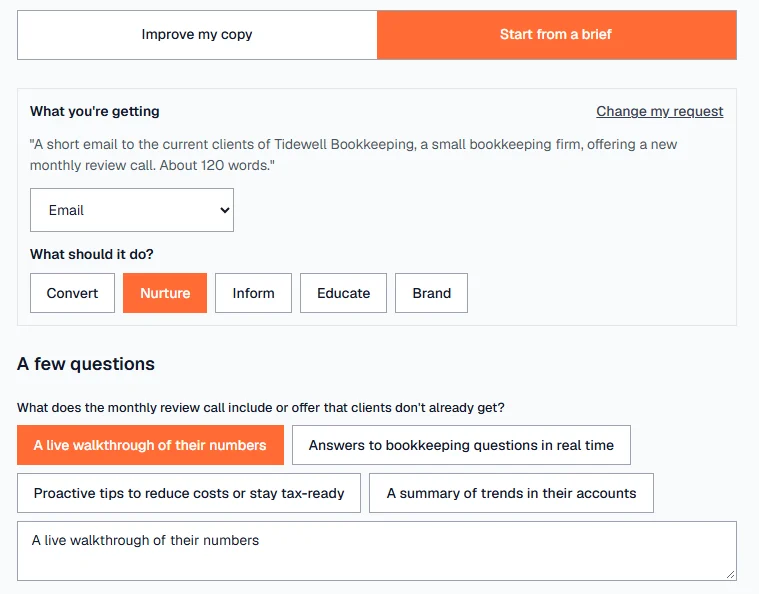
2. Answer the questions
Under A few questions, CopyZap asks only what it needs for this piece: what makes the offer different, what the reader should do, what they get, and what proves it. Each question comes with suggested answers. Click one to use it, change the words in the box, or write your own.
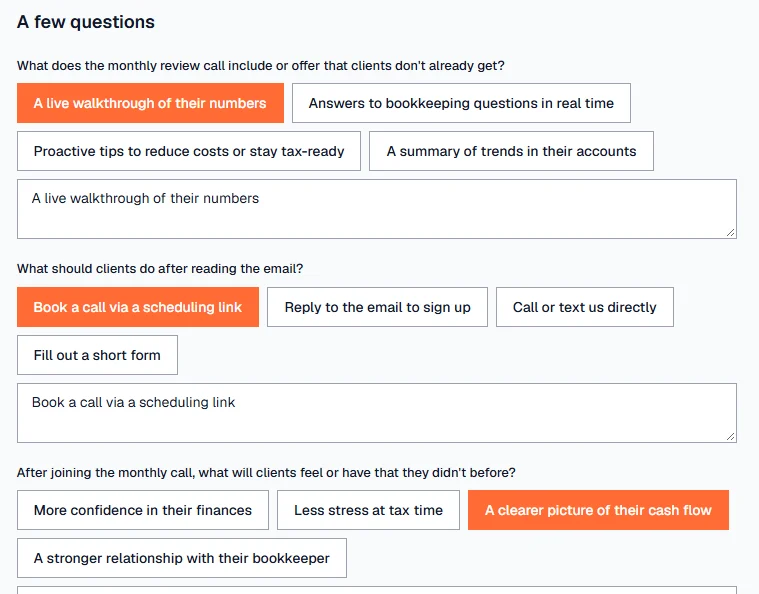
What CopyZap already knows, from your request or your website, sits under Already understood (check or change), together with the tone. Open it to check. An answer taken from your website is used as a fact from the website, not as your own answer, until you change it.
Language and country are set below the questions. The country sets local words, spelling, currency and dates. Formal is usted, Sie or vous; informal is tú, du or tu, in every sentence, the sign-off included.
3. A concrete detail or two
Some answers are what many companies say, like “Already piloted with a few clients”. When you click Write it, CopyZap checks your answers first. If one is too general, it asks for a concrete detail in a box headed Two more details make it much stronger (or one). Answer, or leave a box empty to skip it, and click Write it again.
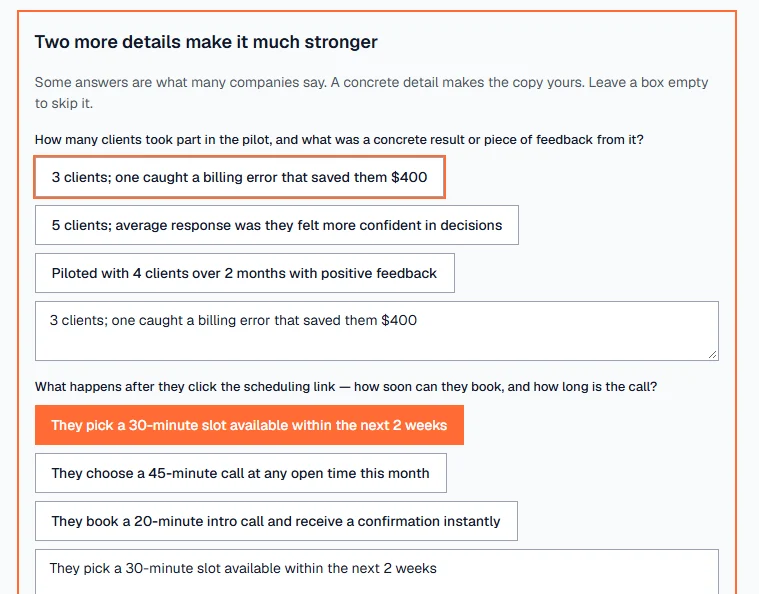
In the Tidewell run, “3 clients; one caught a billing error that saved them $400” went into the email word for word. Without it the line would have said only that the call had been piloted.
Pages and blog posts: the sections
For a page or a blog post, a box Sections (suggested) shows the sections CopyZap plans and about how many words the whole page will have. Add, remove or reorder sections, and give one its own length, before you click Write it. With a word count on every section, the page length is their total. Short texts, emails and ads have no sections.
4. Check and write
CopyZap writes the draft, then shows Here is what I understood: the draft, what you're selling, who it's for, the tone and the language. Fix anything that's wrong, then click Looks right, generate. CopyZap checks the draft and scores it.
While it works, a window shows each step and the time. Cancel stops it.
5. The result
The draft is the result: Draft written from your brief, with its word count, score and level, and the reasons for each part.
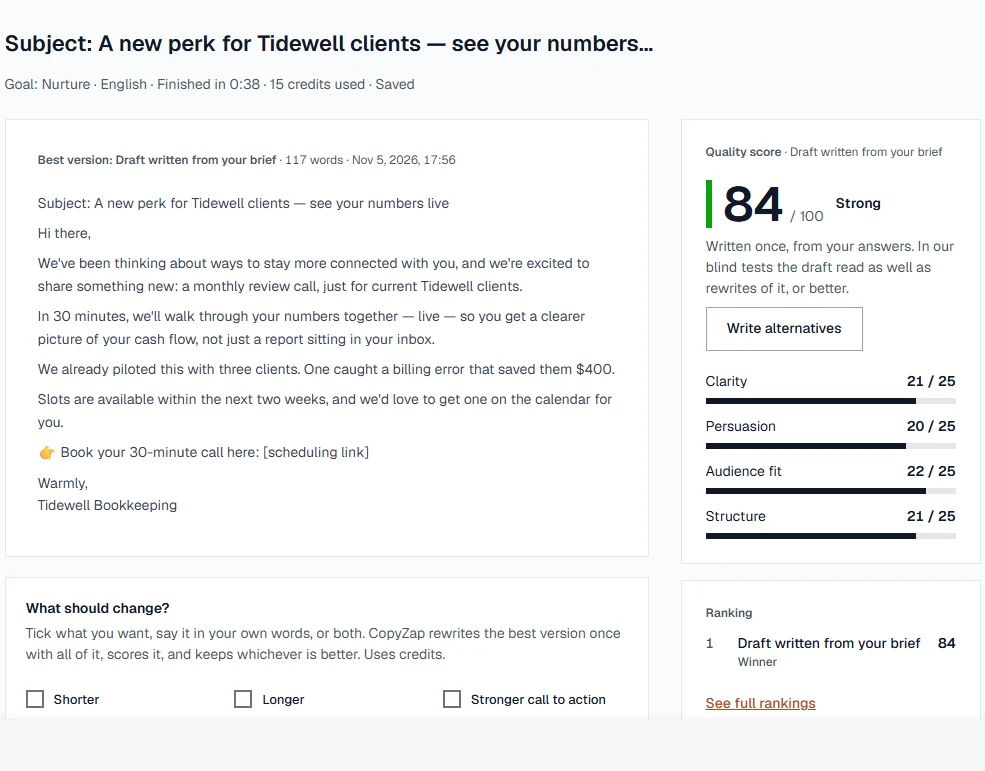
- Check before you publish lists every claim CopyZap couldn't find in your answers or your website. Keep what's true, remove the rest, or reword it. Each open claim costs points until you decide; see Reading the score.
- The bar at the bottom always shows the next step: check the open claims, score again after a change, strengthen a weak call to action, or copy it when everything is checked. Edit, Change it and More… (export, check with another AI, write alternatives, start over) stay in the same place.
- Write alternatives writes rewrites of the draft to compare. It uses more credits. In our blind tests the draft read as well as rewrites of it, or better, so you seldom need it.
- Change it and Edit work as for improved copy: see Change, edit and export.
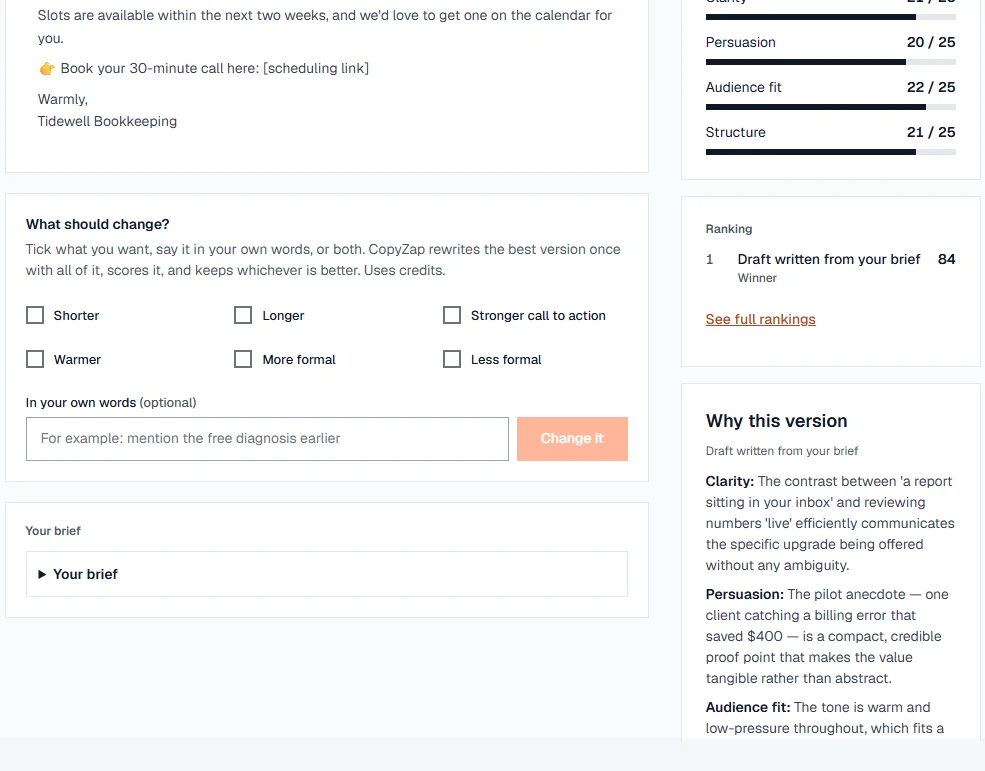
The run is saved in your History with its brief, so you can open it again later.
How a draft is scored
A draft gets the same score as improved copy: clarity, persuasion, audience fit and structure, out of 25 each. Two checks matter most for a draft:
- Generic copy can't score high. Copy that could be about any company is capped, however smooth it reads: “Mostly general claims, not your specifics — capped at 62”.
- Checked against your brief. The wrong form of address, a missing offer, a missing differentiator, a missing call to action, or the wrong kind or length of text cost points. The result says which, under “Not what your brief asked for”. One or two words in the other form, in copy that is otherwise right, cost only a little and are named so you can fix them.
There is no original to compare with, so a draft shows no gain. More on the score and the levels in Reading the score.
Credits and time
The Tidewell email, about 120 words, took 38 seconds and 15 credits in all, questions included. Longer pieces take longer and use more credits; reading a website uses a few more. The credits a run used are shown at the top of the result, and every call is listed in your credits history.
Tips
- Give the length and the reader in your first sentence: “a 120-word email to our current clients” beats “an email”.
- Pick a suggested answer, then make it yours: a number, a name, a place.
- Answer the extra detail when CopyZap asks for one. It is usually the line that makes the copy convincing.
- If the client has a page already, start with Improve my copy instead.